This is my first coding assignment for my software engineering class that started today. It’s going to be a really good semester.
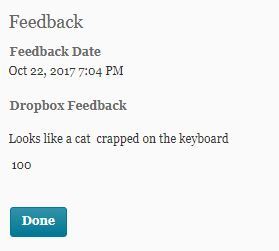
UPDATE: I got my grade back and
“100″
Since this post has gotten some attention, I feel like it’s worth mentioning that this was just the first half of the assignment.
The second half, which we weren’t made aware of until the day we were meant to turn this one in, was to trade USB drives with the person sitting next to us and MODIFY their “unreadable” code without getting any help from them.
This was to teach us two things:
1) In this field, you’ll spend more time working with code written by other people than you will writing original code from a blank slate. The people who wrote the original code will probably not be around to help you. Learning to read code is IMPORTANT, even if it seems unreadable.
2) There is a strong brotherhood/sisterhood among programmers and software engineers. Respect that bond when you’re writing code and documentation. In my professor’s words: “When you write code, pretend that the person who will have to maintain it after you’re gone is a homicidal maniac who knows where you live.”
This class and professor are incredible.
AHHHHHH I need this in my life.
If anyone wants to send me obfuscated code to fix I would be fucking delighted.
@the-real-seebs this looks like a job for the Obfuscated C Contest
y’all didn’t even add a tutorial of how to do this so imma put one right here
1. type in cmd.exe into your windows search and right click on Command Promt search result and select “Run as Administator”. 2. Type/Copypase in
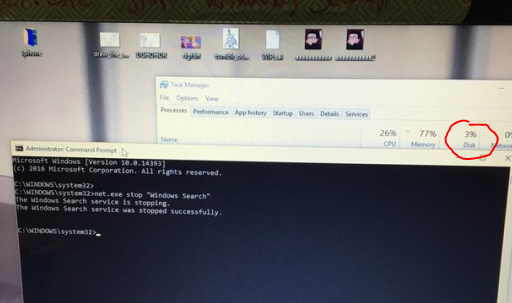
net.exe stop “Windows Search” and make sure Windows Search is in quotations. It should then respond saying “The Windows Search service is stopping” and then tell you it’s stopped.
This is only a temp fix though, if you want it switched off permanently then do THIS:
1. Press the Windows key + R at the same time and type in services.msc.
2. Scroll until you find Windows Search and double click it to enter its Properties window.
3. Change the Startup type to Disabled. Apply this change and you can exit out.
y’all didn’t even add a tutorial of how to do this so imma put one right here
1. type in cmd.exe into your windows search and right click on Command Promt search result and select “Run as Administator”. 2. Type/Copypase in
net.exe stop “Windows Search” and make sure Windows Search is in quotations. It should then respond saying “The Windows Search service is stopping” and then tell you it’s stopped.
This is only a temp fix though, if you want it switched off permanently then do THIS:
1. Press the Windows key + R at the same time and type in services.msc.
2. Scroll until you find Windows Search and double click it to enter its Properties window.
3. Change the Startup type to Disabled. Apply this change and you can exit out.

 just moving along like everyone else