So apparently tumblr is going through some nsfw blog purges or some shit (to maybe handle all those porn blogs? idk this is such a hellsite) and accounts are getting deleted without notice even if you’re not posting nsfw content yourself.
Apparently the tumblr app got deleted from the Apple store due to the insane amounts of porn on here (the bots… we all know its the bots they haven’t given a shit about) so in order to get back into the app store, they’re on a deleting frenzy apparently (most likely a code that’s deleting without prejudice, and hopefully in wrong, properly-marked instances, folks can appeal the delete… idk right now). LOTS of artists have lost their work.
If you reblog NSFW material- not necessarily post it yourself- you’re at risk too, so mark your blog ‘explicit’ to save from being deleted. If you’ve ever reblogged anything from your safe-for-work blog which is explicit, mark it explicit anyways (better safe than sorry i guess).
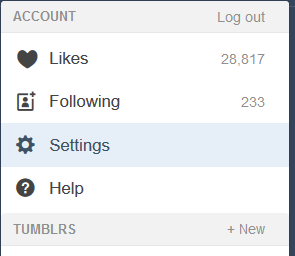
On desktop:
You need to go to your settings (click the little man icon to get to the gear icon for settings)>click each individual blog (if you have side blogs)>scroll down to Visibility> and then mark that your blog/sideblog is explicit.
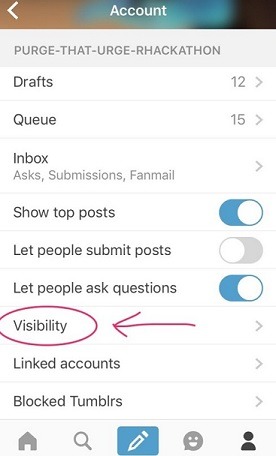
On mobile iOS:
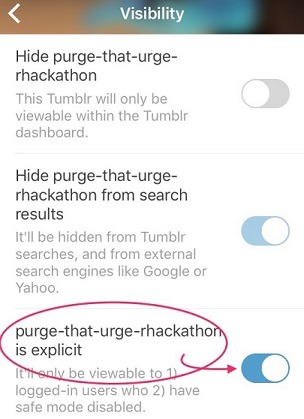
Same thing. Click the little man to be taken to whatever blog you have selected atm> select the gear icon in the upper righthand corner for Settings>Scroll down to Visibility > mark explicit.
What mine looks like:
What happens when you do this is 1) it’ll hide your blog from anyone that has safesearch on (i.e. minors/folks who don’t like explicit stuff i guess?) and 2)any outside links you have to your blog (for example, I link my tumblr page on ao3 accounts) will no longer show up if the user isn’t logged in (you’ll get that “nothing new here” static page tumblr has when you’re logged out).
—>If you link your blogs from outside platforms like I do, you might want to make a note on those platforms that users will need to be logged in to see your blog (otherwise they might think the blog is deleted/deactivated/the person moved on to elsewhere etc. and that IS going to impact the hits you get and the amount of followers)
BACK UP YOUR BLOG:
It’ll save the data as such:
A Posts folder, with an HTML file for each post.
A Media folder, with the media from your posts, plus any media you’ve uploaded (like in messaging). These files will be in the format you uploaded them in (JPG, GIF, PNG, MP4, and so on).
A representation of your blog’s messaging conversations, in XML format.
A representation of your blog’s posts, also in XML format.thats all the stuff it has
It’s really easy to do (you have to do it from desktop; can’t export to your phone or something, though I might not be correct on that) following the same steps as above. Just when you click each individual blog, scroll all the way down, and under Blocked Tumblrs you will see Export Username (the username will match whichever blog you’re exporting). You will see a “Backup Processing…” note there instead of the export thing. It’s slow, especially if you’ve been here for years, but it does its thing.
Right now it seems like super-popular artists are getting hit first (laziness of code going after the biggest hits) but please protect yourself and back up your work. Also take steps to ensure your audiences on other platforms know wtf goes on on this hellsite and that they need an account or whatever. bleh


 just moving along like everyone else